
SNMP SET Tutorial with IF-MIB
This tutorial changes the administrative state of interface index 2 from
up to down. It then verifies the same value through the server
configuration and an SNMP GET. Use a test interface and test system: changing
ifAdminStatus on a production interface can interrupt connectivity.
How an SNMP SET reaches the datastore
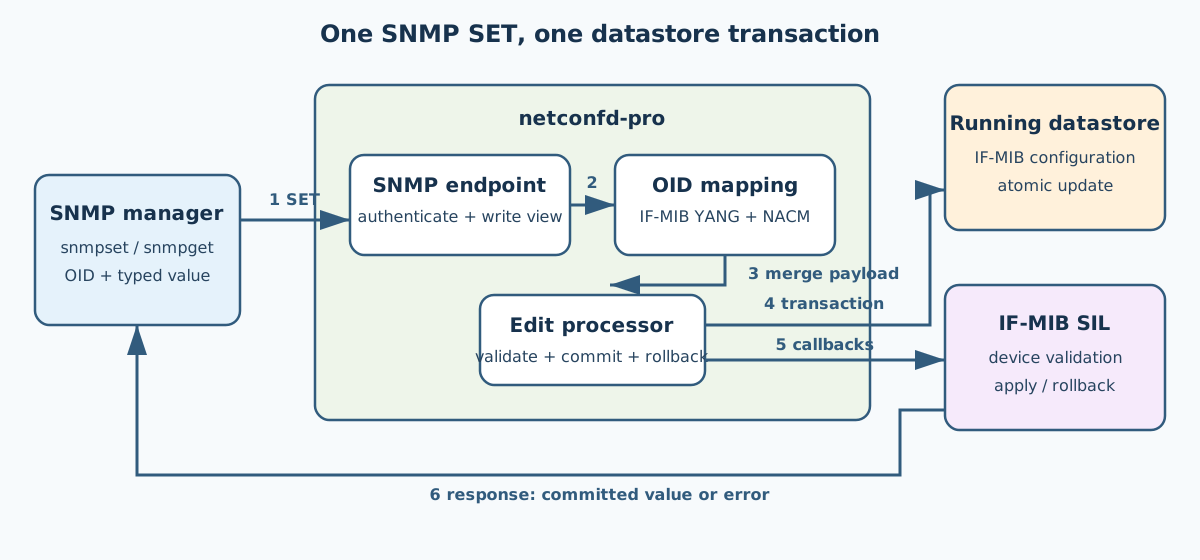
The Net-SNMP command-line manager sends one or more varbinds to the native
SNMP endpoint in netconfd-pro. The endpoint authenticates the SNMP
security name and checks its write view. The server maps each OID to the
converted IF-MIB YANG schema, checks NACM, and submits all varbinds as one
transaction to the normal datastore edit processor. The IF-MIB SIL validates
and applies the device change. A failure rolls back the entire request; a
successful request updates the datastore and returns the resulting value.
SNMP Prerequisites
Install the yumapro-snmp package when using a binary server, and install
the Net-SNMP command-line tools supplied by the operating system.
When building the server from source, both feature flags are required because SNMP SET uses the RESTCONF patch/edit processor:
make EVERYTHING=1 WITH_SNMP=1 WITH_RESTCONF=1
Do not run the source-build command when using the packaged binary. This
tutorial still requires an edit-capable custom IF-MIB SIL: the packaged
libIF-MIB.so is a GET2-only example and cannot apply ifAdminStatus
SET requests. Generate or build an IF-MIB SIL with edit callbacks as described
in Creating MIB Instrumentation, or use the disposable live fixture in
netconf/test/snmp-test/run-server-set-tests.py.
This example uses SNMPv2c so the request and response are easy to inspect.
SNMPv2c community strings are sent in clear text and are suitable only for an
isolated tutorial network. Use SNMPv3 authPriv in production, as described
in SNMP Security and SNMPv3.
Configure a write community
Stop the operating-system snmpd service if it is using UDP port 161;
netconfd-pro is the SNMP master agent in this tutorial. Add a restricted
read-write community to the active Net-SNMP snmpd.conf file:
rwcommunity set-demo 127.0.0.1 .1.3.6.1.2.1.2
Depending on the Net-SNMP installation, the active file is commonly
/usr/local/share/snmp/snmpd.conf or /etc/yumapro/snmpd.conf. The final
OID limits the community's view to the interfaces subtree. The explicit
subtree is important because SET requires a matching write view.
The SNMP security name must also have NACM update permission for the IF-MIB
configuration. To keep the first run focused on the SET data path, the server
command below disables NACM. Do not disable access control in production;
instead, configure a NACM rule for the security name associated with
set-demo.
Start the server
Start the server in the foreground with the IF-MIB module and your edit-capable custom SIL:
sudo netconfd-pro --with-snmp=true --snmp-agent-role=master \
  --with-restconf=true --module=IF-MIB \
  --runpath=/path/to/custom/if-mib-sil --access-control=off \
  --log-level=debug4
The privileged command is needed for the standard SNMP UDP port 161. During
startup, confirm that the log reports SNMP master initialization, IF-MIB
loading, and no Address already in use error. Replace
/path/to/custom/if-mib-sil with the directory containing the edit-capable
libIF-MIB.so built for this tutorial.
Find a safe interface index
List the interface descriptions and administrative states in another terminal:
snmpwalk -v 2c -c set-demo localhost IF-MIB::ifDescr
snmpwalk -v 2c -c set-demo localhost IF-MIB::ifAdminStatus
The remainder of the tutorial uses index 2. Replace the final .2 in every
command with the index of a disposable interface on the test system. The
numeric object identifier for ifAdminStatus is
1.3.6.1.2.1.2.2.1.7; its values are up(1), down(2), and
testing(3).
Send the SET
Set interface 2 to down(2). The i tells snmpset to encode the
value as an INTEGER:
snmpset -v 2c -c set-demo localhost \
  IF-MIB::ifAdminStatus.2 i 2
A successful response echoes the committed value:
IF-MIB::ifAdminStatus.2 = INTEGER: down(2)
The response means the complete transaction passed the write-view, NACM, schema, datastore, and SIL checks. An error response does not partially apply a multi-varbind request.
Inspect the server configuration
Connect yangcli-pro to the server and read the running datastore:
yangcli-pro
connect server=localhost user=$USER
sget-config /IF-MIB/ifTable/ifEntry[ifIndex='2'] source=running
The relevant server configuration after the SET is:
<IF-MIB xmlns="urn:ietf:params:xml:ns:yang:smiv2:IF-MIB">
  <ifTable>
    <ifEntry>
      <ifIndex>2</ifIndex>
      <ifAdminStatus>down</ifAdminStatus>
    </ifEntry>
  </ifTable>
</IF-MIB>
The exact display can include additional configured leafs. The important
result is that the running datastore contains ifAdminStatus value
down for the same ifIndex selected by the instance OID.
Verify with SNMP GET
Read the object through the SNMP endpoint:
snmpget -v 2c -c set-demo localhost IF-MIB::ifAdminStatus.2
The result should agree with the running configuration:
IF-MIB::ifAdminStatus.2 = INTEGER: down(2)
Restore the interface when the exercise is complete:
snmpset -v 2c -c set-demo localhost \
  IF-MIB::ifAdminStatus.2 i 1
If the SET is rejected, check the server log in this order: the Net-SNMP write view, the security-name-to-NACM mapping and update permission, whether the IF-MIB object is configuration data, and whether the loaded SIL implements its edit callback. See SNMP SET Operations for supported encodings and transaction restrictions.