IETF-Interfaces Example: YANG Module and SIL
This tutorial describes how to prepare a YANG module and build a Server Instrumentation Library (SIL) that encapsulates the corresponding instrumentation code.
The ietf-interfaces YANG module is used as the reference example. Current YumaPro releases include a pre-built SIL library, libietf-interfaces.so, for this module. The following sections describe how to generate and customize a SIL library from the ietf-interfaces YANG source.
Pre-Requisites
YumaPro SDK must be installed and configured as described in the YumaPro Installation Guide.
Working with a YANG Module and Creating SIL Source Code
Instrumentation used by the server for system attributes, interface counters, configuration data, and similar information is provided by Server Instrumentation Libraries. A SIL contains the code that hooks the YANG data model into the system.
Creating SILs is heavily automated and hides details of NETCONF, the transaction model, and protocol encoding. The process is:
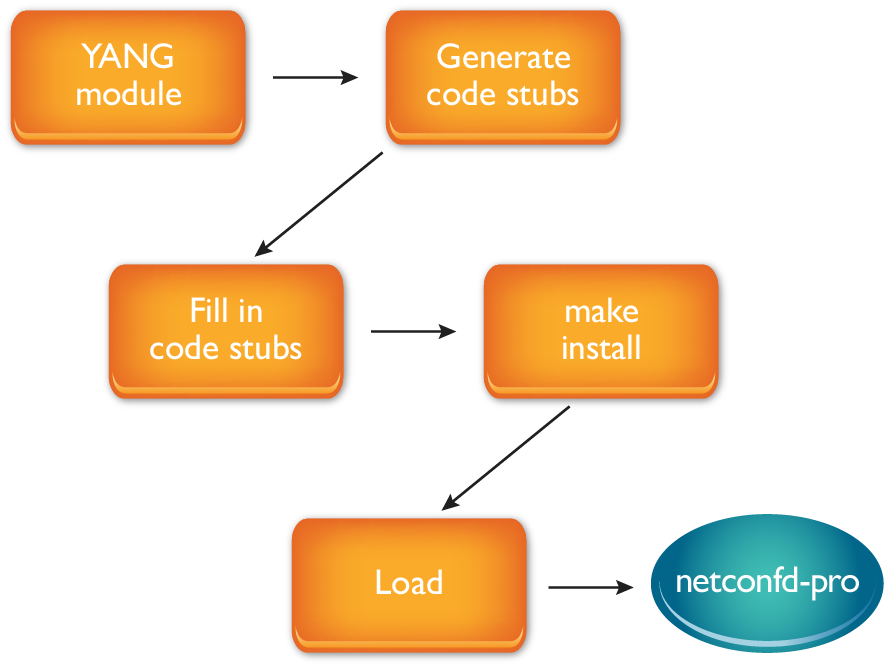
Have the YANG module ready and stored in a location that the server can access.
Run 'make_sil_dir_pro' with the YANG module to generate SIL source code.
Add instrumentation to the code stubs in the source files.
make and install the SIL.
Load the YANG module and the SIL into the server.
These steps are explained in more detail in the rest of this lesson.
Preparing the YANG Module
No special steps are required to prepare the YANG module. The module must be visible to the server by placing it in a directory that the server can access.
The simplest approach is to store modules in $HOME/modules. This is the first location where the server and other tools look for modules. If the server finds a module there it does not look anywhere else for that module.
A separate work directory may be used so work in progress does not conflict with modules provided by YumaPro SDK. This step is optional. If a work directory is used (for example ~/work), it is added to the YumaPro search path using the $YUMAPRO_MODPATH environment variable.
Example:
mkdir $HOME/modules
cd $HOME/modules
or optional step:
mkdir ~/work
cd ~/work
YUMAPRO_MODPATH=~/work
export YUMAPRO_MODPATH
When a separate work directory is used, $YUMAPRO_MODPATH is typically set in a shell startup file so it is active after a reboot.
For more on YumaPro environment variables see the YumaPro User Manual section Environment Variables and $YUMAPRO_MODPATH.
Generating the SIL Source Code
Copy the YANG module into $HOME/modules or the work directory. In this lesson the ietf-interfaces YANG module is used:
cp /usr/share/yumapro/modules/ietf/RFC/ietf-interfaces@2018-02-20.yang .
make_sil_dir_pro ietf-interfaces --sil-get2 --sil-edit2
The parameters --sil-get2 and --sil-edit2 tell make_sil_dir_pro to generate SIL code that uses YumaPro SDK second generation callbacks for operational and configuration data. These parameters are covered in more detail in other lessons.
Starting with YumaPro 24.10 releases, the default SIL generation mode is --sil-edit3, instead of --sil-edit2.
Output from make_sil_dir_pro looks similar to:
modparms =  --sil-get2 --sil-edit2
cmnparms = --indent=4 --module=ietf-interfaces --unified=true

*** /home/user-1/modules/ietf-interfaces@2018-02-20.yang
*** 0 Errors, 0 Warnings

...

Run the following commands to get started:

  cd ietf-interfaces
  make doc
  make opendoc
The generated src directory contains the SIL source files:
ls -al ietf-interfaces/src
total 112
drwxrwxr-x 2 user-1 user-1  4096 Nov 19 09:53 .
drwxrwxr-x 5 user-1 user-1  4096 Nov 19 09:53 ..
-rw-rw-r-- 1 user-1 user-1 10018 Nov 19 09:53 Makefile
-rw-rw-r-- 1 user-1 user-1 38791 Nov 19 09:53 u_ietf-interfaces.c
-rw-rw-r-- 1 user-1 user-1 14352 Nov 19 09:53 u_ietf-interfaces.h
-rw-rw-r-- 1 user-1 user-1 28002 Nov 19 09:53 y_ietf-interfaces.c
-rw-rw-r-- 1 user-1 user-1  4841 Nov 19 09:53 y_ietf-interfaces.h
This creates a directory with the same name as the YANG module (ietf-interfaces). Within that directory there are bin, lib and src subdirectories. The src directory contains the source files used to build the SIL:
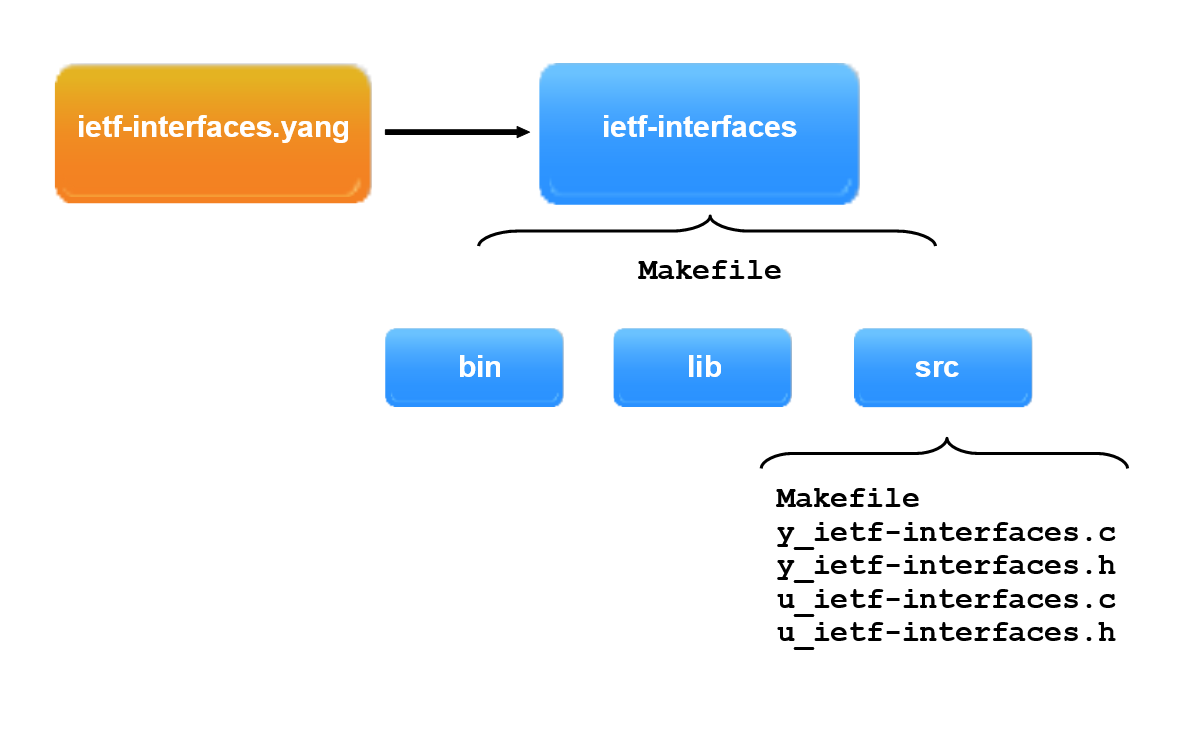
Generated files:
Makefile - builds and installs the SIL.
u_ietf-interfaces.c - user source code for the YANG module.
u_ietf-interfaces.h - user header file for the YANG module.
y_ietf-interfaces.c - YumaPro system source code for the module.
y_ietf-interfaces.h - YumaPro system header file for the module.
There are two types of source files: u_* user files and y_* system files.
The u_* files contain user callback functions needed to hook YANG operational and configuration data to the underlying system. The code stubs in these files are replaced by system specific code to commit configuration changes or retrieve data.
The y_* files contain system code that keeps SILs protocol and encoding independent and integrates user callbacks into the transaction engine. These files are not intended for modification.
For more information see the SIL and SIL-SA Overview section of the YumaPro User Manual and the make_sil_dir_pro manual page:
man make_sil_dir_pro
See also: Server Source Code Generation
Doxygen Documentation
This step is optional and is only required when inspection of the generated API documentation in a browser is needed.
After make_sil_dir_pro finishes it prints:
Run the following commands to get started:
  cd ietf-interfaces
  make doc
  make opendoc
These commands generate Doxygen content and add it to the YumaPro Doxygen browser for inspection and reference.
Run:
cd ietf-interfaces
make doc
Doxygen output ends with text similar to:
Documentation created in /home/user-1/modules/ietf-interfaces/output directory
file:///home/user-1/modules/ietf-interfaces/output/html/index.html
Then run:
make opendoc
This opens the YumaPro Doxygen browser home page:
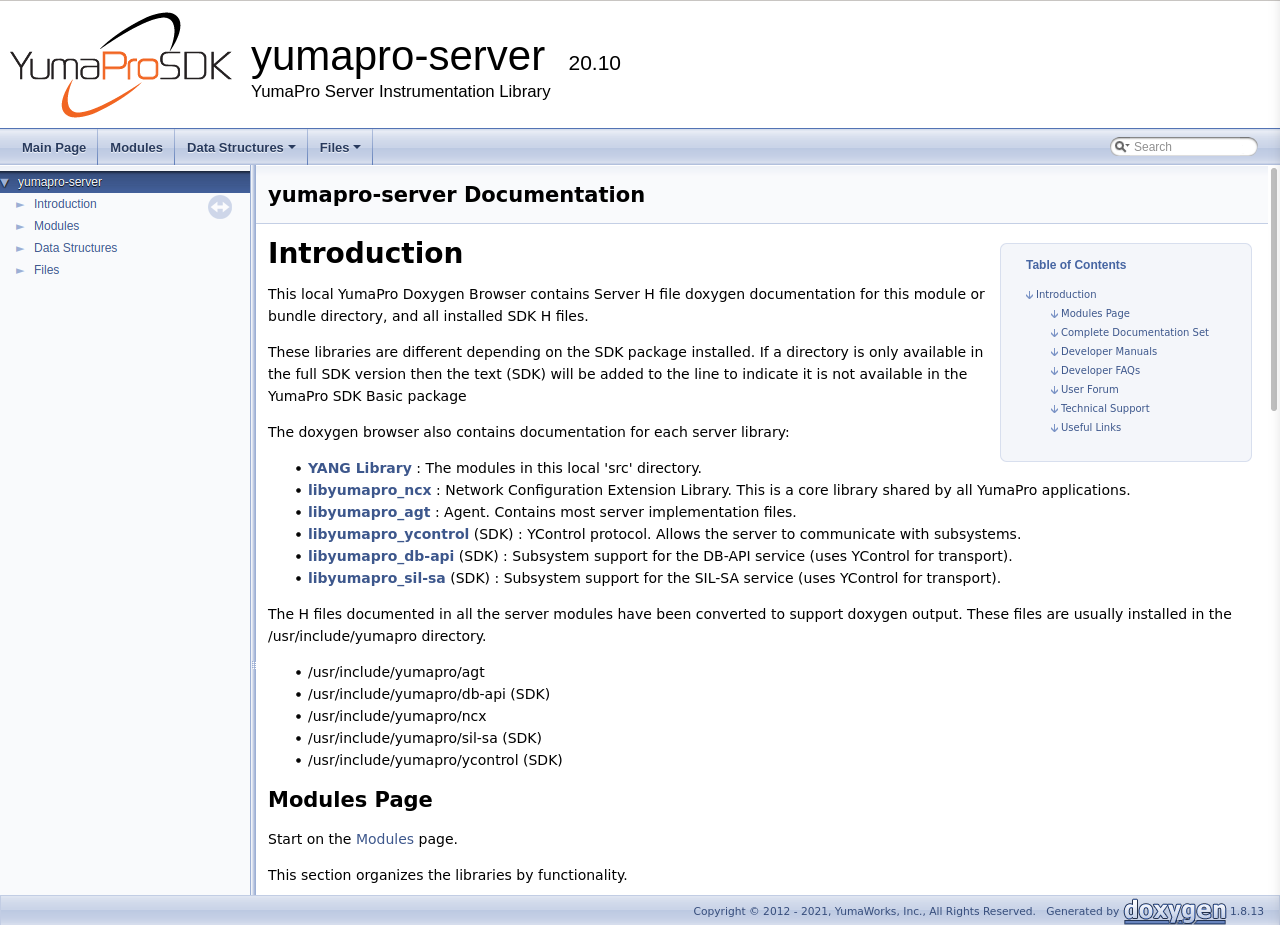
Select: Topics -> YANG Library -> Module ietf-interfaces
APIs such as y_if_T_interface and related collaboration diagrams can then be inspected:
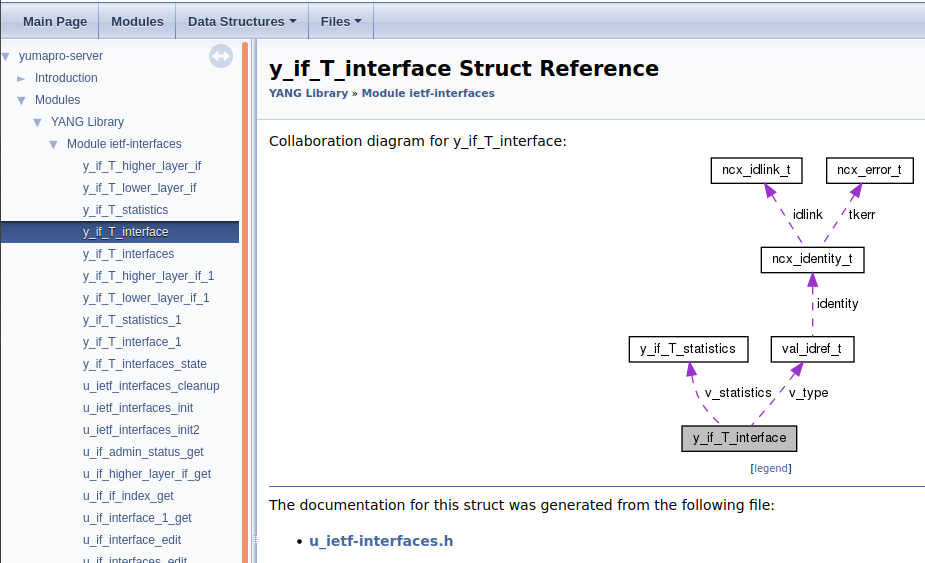
Hovering over any element shows a short description. Selecting an element opens its detail page, for example ncx_idlink_t:
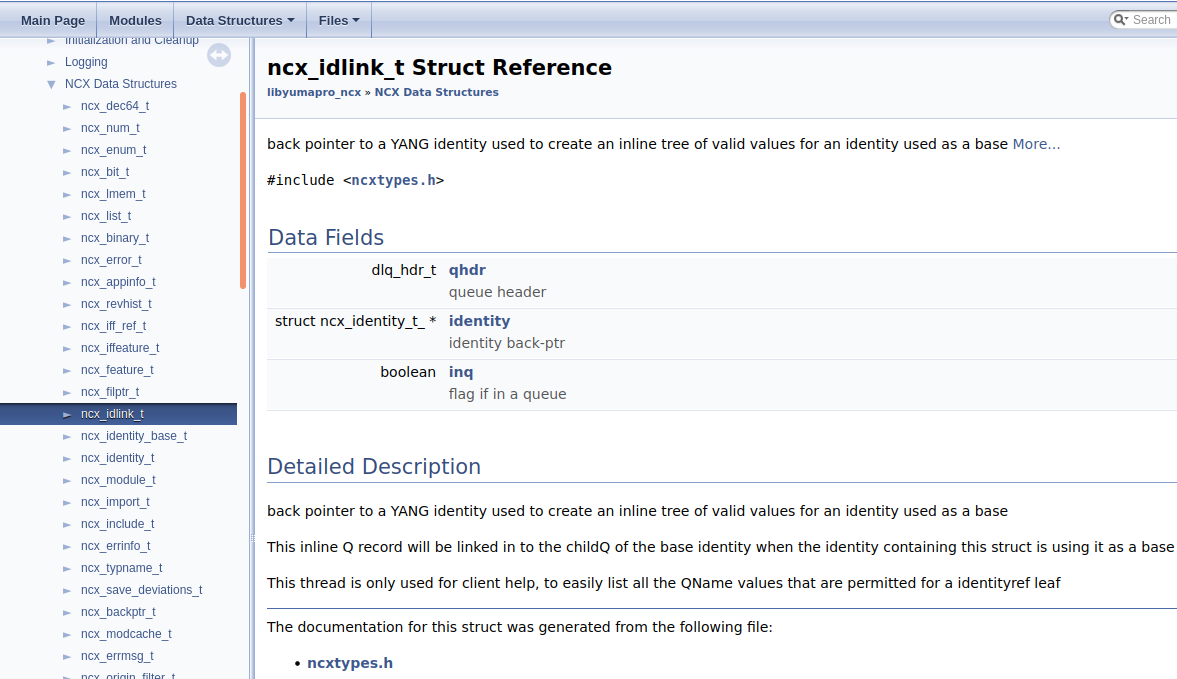
The output for the latest YumaPro release is also available online at YumaPro Doxygen output.
YANG and SIL Module Components
This section explains how YANG objects map to generated SIL stub functions.
The examples assume that the YumaPro Installation Guide and the earlier parts of this lesson ( YANG preparation and SIL generation) have been completed.
YANG Objects: Container, List and Choice
A typical YANG module starts with a top level container, which may contain list objects, other containers, and choice objects.
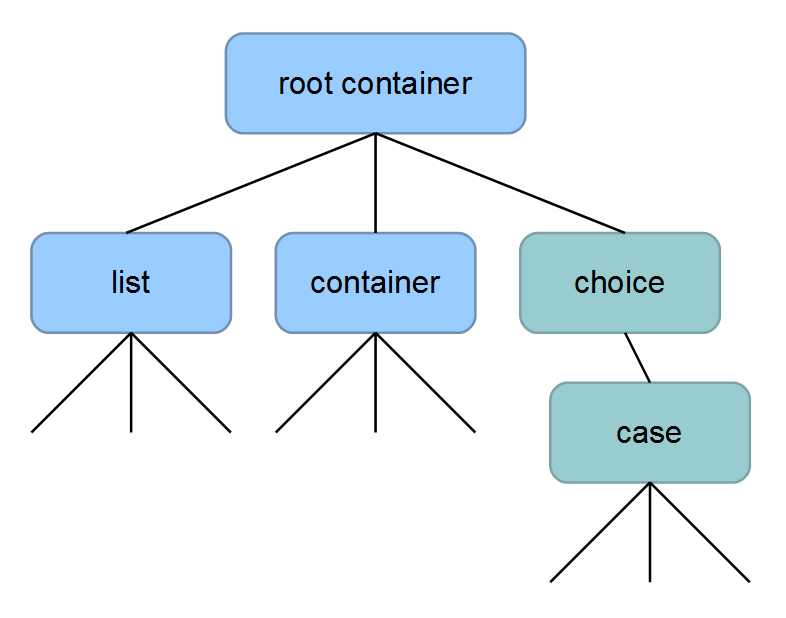
The ietf-interfaces YANG module includes:
container interfaces - configuration and operational state data.
container interfaces-state - operational state data (config false, deprecated).
container statistics - nested under interfaces/interface and, for backwards compatibility, under interfaces-state/interface.
All containers have collections of child nodes and leafs.
For more details see YANG Objects in the YumaPro Server Overview and RFC 7950 Section 7.5.
Mapping to Generated SIL Stubs
The generated u_ietf-interfaces.c file mirrors the YANG model. It contains a function that retrieves data for each container and stub code for each leaf in that container.
For example, operational state containers:
ietf-interfaces.yang - nodes |
u_ietf-interfaces.c - stubs |
|---|---|
container /interfaces |
u_if_interfaces_edit() |
list /interfaces/interface |
u_if_interface_edit() |
child container statistics |
u_if_statistics_get() |
container /interfaces-state |
u_if_interfaces_state_get() |
list /interfaces-state/interface |
u_if_interface_1_get() |
child container statistics |
u_if_statistics_1_get() |
The generated SIL source code contains stub implementations for all containers and leaf nodes defined in the ietf-interfaces YANG module. These stubs are functional but contain no system-specific logic. Custom instrumentation must be added to provide real operational or configuration data.
YumaPro Instrumentation Functions: EDIT2 and GET2
SIL stubs for configuration data use EDIT2 callbacks. These callbacks provide a common set of access functions regardless of the configuration database model such as candidate and running. The EDIT2 layer uses a common database template and helper functions.
Operational data stubs use GET2 callbacks. The GET2 template provides helper functions for accessing operational data from the server.
Building and Installing the SIL
This section shows how to build and install a SIL created from a YANG module.
The steps assume that the YANG module has been prepared and the SIL components have been generated and examined.
YumaPro Built-in IETF-Interfaces Example
YumaPro SDK provides a pre-built implementation of the ietf-interfaces SIL with sample instrumentation for operational state data in the library libietf-interfaces.so. This library is for Linux systems.
Implementation notes:
The example is based on the 2018-02-20 version of ietf-interfaces (RFC 8343).
Interface configuration and statistics are provided under the /interfaces subtree.
The deprecated /interfaces-state subtree is not used.
Before editing the generated stub SIL code for the ietf-interfaces YANG module it is useful to see how a real SIL implementation looks, including instrumentation to retrieve interface counters.
To use the built-in SIL the required YANG modules must be loaded, for example:
netconfd-pro --log-level=debug4 --access-control=off --no-config \
             --module=iana-if-type --module=ietf-interfaces
Note
YANG module iana-if-type must be loaded together with ietf-interfaces to provide identities for the /interfaces/interface/type leaf. Without this module interface list entries cannot be created or modified correctly.
In a second terminal start yangcli-pro and connect to the server. Live data from system interfaces can then be displayed by running, for example:
yangcli-pro log-level=debug4
connect server=localhost user=user-1 password=password-1
sget /interfaces
By running the sget command multiple times the counters will be seen updating. A reply can look like this:
rpc-reply {
  data {
    interfaces {
      interface  lo {
        name lo
        description lo
        type ianaift:softwareLoopback
        enabled true
        oper-status down
        phys-address 00:00:00:00:00:00
        statistics {
          in-octets 102541627
          in-multicast-pkts 0
          in-discards 0
          in-errors 0
          in-unknown-protos 0
          out-octets 102541627
          out-discards 0
          out-errors 0
        }
      }
      interface  eno1 {
        name eno1
        description eno1
        type ianaift:ethernetCsmacd
        enabled true
        oper-status up
        phys-address 3c:7c:3f:1d:83:ee
        speed 1000000000
        statistics {
          in-octets 2349816101
          in-multicast-pkts 9786806
          in-discards 0
          in-errors 0
          in-unknown-protos 0
          out-octets 1729038372
          out-discards 0
          out-errors 0
        }
      }
    }
  }
}
The pre-built library includes support for standard Linux interfaces. Values can be compared with Linux system output, for example:
ifconfig
Similar output:
eno1: flags=4163<UP,BROADCAST,RUNNING,MULTICAST>  mtu 1500
        inet 192.168.0.241  netmask 255.255.255.0  broadcast 192.168.0.255
        inet6 fe80::b13b:3a3a:2f00:cf16  prefixlen 64  scopeid 0x20<link>
        ether 3c:7c:3f:1d:83:ee  txqueuelen 1000  (Ethernet)
        RX packets 30800535  bytes 28174722172 (28.1 GB)
        RX errors 0  dropped 0  overruns 0  frame 0
        TX packets 6347499  bytes 1730872614 (1.7 GB)
        TX errors 0  dropped 0 overruns 0  carrier 0  collisions 0
        device interrupt 16  memory 0xa1200000-a1220000

lo: flags=73<UP,LOOPBACK,RUNNING>  mtu 65536
        inet 127.0.0.1  netmask 255.0.0.0
        inet6 ::1  prefixlen 128  scopeid 0x10<host>
        loop  txqueuelen 1000  (Local Loopback)
        RX packets 478356  bytes 102626454 (102.6 MB)
        RX errors 0  dropped 0  overruns 0  frame 0
        TX packets 478356  bytes 102626454 (102.6 MB)
        TX errors 0  dropped 0 overruns 0  carrier 0  collisions 0
While yangcli-pro displays the data, the server log shows the NETCONF requests and replies that carry the ietf-interfaces statistics RPC reply.
Editing and Rebuilding a Custom SIL
A custom SIL implementation for the ietf-interfaces module can be created based on the generated stubs in u_ietf-interfaces.c.
The configuration list /interfaces/interface is config true and uses EDIT2 callbacks only. There is no GET2 callback for the list itself. GET2 callbacks are generated for config-false children under /interfaces/interface such as admin-status, speed and the statistics container.
The helper API used in the code snippets is called val_make_simval_obj. Thus function is the simplest and most universal API to create a val_value_t instance. It accepts the value as a string and can be used for any data type once the object template for the node and the desired value are known.
Creating a Test Interface with Edit-Config
First, create a configuration interface entry with a normal <edit-config>. Any NETCONF client, such as yangcli-pro, can be used to send a request similar to:
<?xml version="1.0" encoding="UTF-8"?>
<rpc message-id="1"
 xmlns="urn:ietf:params:xml:ns:netconf:base:1.0">
 <edit-config>
  <target>
   <running/>
  </target>
  <default-operation>merge</default-operation>
  <test-option>set</test-option>
  <config>
   <interfaces xmlns="urn:ietf:params:xml:ns:yang:ietf-interfaces">
    <interface>
     <name>vlan1</name>
     <description>demo vlan</description>
     <type
      xmlns:ianaift="urn:ietf:params:xml:ns:yang:iana-if-type">ianaift:l2vlan</type>
    </interface>
   </interfaces>
  </config>
 </edit-config>
</rpc>
After this edit, the list entry /interfaces/interface[name='vlan1'] exists in the running configuration. The operational data for this entry is provided by the GET2 callbacks shown below.
The same configuration can be created interactively from yangcli-pro:
yangcli-pro log-level=debug4
connect server=localhost user=user-1 password=password-1
config term
interfaces interface vlan1 description "demo vlan" type l2vlan
exit
commit
The operational prompt ends with ">" (for example, "user-1@localhost> "). After "config term" the prompt ends with "#" to indicate configuration mode (for example, "user-1@localhost# "). The example exits configuration mode before issuing commit so the changes are saved from operational mode.
Instrumenting GET2 for Admin-Status and Speed
The generated stubs for the config-false leaves /interfaces/interface/admin-status and /interfaces/interface/speed are u_if_admin_status_get and u_if_speed_get. These can be filled in with fixed values as follows:
status_t u_if_admin_status_get (
    getcb_get2_t *get2cb,
    const xmlChar *k_if_name)
{

    (void)k_if_name;  // remove if used

    if (LOGDEBUG) {
        log_debug("\nEnter u_if_admin_status_get");
    }

    /* check the callback mode type */
    getcb_mode_t cbmode = GETCB_GET2_CBMODE(get2cb);
    switch (cbmode) {
    case GETCB_GET_VALUE:
        break;
    case GETCB_GETNEXT_VALUE:
        return ERR_NCX_NO_INSTANCE;
    default:
        FLAG_INT_ERROR;
        return ERR_INTERNAL_VAL;
    }

    obj_template_t *obj = GETCB_GET2_OBJ(get2cb);
    status_t res = NO_ERR;

    /* fixed admin-status value "up" */
    const xmlChar *v_admin_status = (const xmlChar *)"up";

    val_value_t *return_val =
        val_make_simval_obj(obj, v_admin_status, &res);
    if (return_val) {
        getcb_add_return_val(get2cb, return_val);
    }

    return res;

} /* u_if_admin_status_get */
status_t u_if_speed_get (
    getcb_get2_t *get2cb,
    const xmlChar *k_if_name)
{

    (void)k_if_name;  // remove if used

    if (LOGDEBUG) {
        log_debug("\nEnter u_if_speed_get");
    }

    /* check the callback mode type */
    getcb_mode_t cbmode = GETCB_GET2_CBMODE(get2cb);
    switch (cbmode) {
    case GETCB_GET_VALUE:
        break;
    case GETCB_GETNEXT_VALUE:
        return ERR_NCX_NO_INSTANCE;
    default:
        FLAG_INT_ERROR;
        return ERR_INTERNAL_VAL;
    }

    obj_template_t *obj = GETCB_GET2_OBJ(get2cb);
    status_t res = NO_ERR;

    /* fixed speed value 500 */
    val_value_t *return_val = val_make_simval_obj(
        obj,
        (const xmlChar *)"500",
        &res);
    if (return_val) {
        getcb_add_return_val(get2cb, return_val);
    }

    return res;

} /* u_if_speed_get */
Instrumenting GET2 for Statistics
To provide hardwired counters for the statistics container /interfaces/interface/statistics, the generated stub u_if_statistics_get can be updated. The example below returns in-octets = 1000 and out-octets = 0 for the requested interface and prints a distinctive log message:
status_t u_if_statistics_get (
    getcb_get2_t *get2cb,
    const xmlChar *k_if_name)
{

    (void)k_if_name;  // remove if used

    if (LOGDEBUG) {
        log_debug("\nEnter u_if_statistics_get");
    }

    /* check the callback mode type */
    getcb_mode_t cbmode = GETCB_GET2_CBMODE(get2cb);
    switch (cbmode) {
    case GETCB_GET_VALUE:
        break;
    case GETCB_GETNEXT_VALUE:
        return ERR_NCX_NO_INSTANCE;
    default:
        FLAG_INT_ERROR;
        return ERR_INTERNAL_VAL;
    }

    /* an NP container always exists so no test for node_exists
    * by the SIL or SIL-SA callback is needed
    */
    /* optional: check if any content-match nodes are present */
    boolean match_test_done = FALSE;
    val_value_t *match_val = GETCB_GET2_FIRST_MATCH(get2cb);
    for (; match_val; match_val =
        GETCB_GET2_NEXT_MATCH(get2cb, match_val)) {

        /**** CHECK CONTENT NODES AGAINST THIS ENTRY ***/

    }
    GETCB_GET2_MATCH_TEST_DONE(get2cb) = match_test_done;

    obj_template_t *obj = GETCB_GET2_OBJ(get2cb);
    status_t res = NO_ERR;

    /* go through all the requested terminal child objects */
    obj_template_t *childobj =
        getcb_first_requested_child(get2cb, obj);
    for (; childobj; childobj =
        getcb_next_requested_child(get2cb, childobj)) {

        const xmlChar *name = obj_get_name(childobj);
        val_value_t *return_val = NULL;

        if (!xml_strcmp(name, y_if_N_in_octets)) {
            /* leaf in-octets (uint64) */
            return_val = val_make_simval_obj(
                childobj,
                (const xmlChar *)"1000",
                &res);
        } else if (!xml_strcmp(name, y_if_N_out_octets)) {
            /* leaf out-octets (uint64) */
            return_val = val_make_simval_obj(
                childobj,
                (const xmlChar *)"0",
                &res);
        }

        if (return_val) {
            getcb_add_return_val(get2cb, return_val);
        }
    }

    return res;

} /* u_if_statistics_get */
Rebuilding and Installing the SIL
After editing the stubs, rebuild and install the SIL library:
cd ietf-interfaces
make
sudo make install
The newly built libietf-interfaces.so overwrites the existing library installed by YumaPro. After the server is restarted it loads the SIL that was just built.
To restore the built-in YumaPro SIL, rebuild it from the YumaPro sources:
cd <yumapro_source>/libietf-interfaces
make
sudo make install
Testing the Custom SIL
With the custom SIL installed, start the server as before:
netconfd-pro --log-level=debug4 --access-control=off --no-config \
             --module=iana-if-type --module=ietf-interfaces
In a second terminal start yangcli-pro, connect to the server, and request statistics for the interfaces list:
yangcli-pro log-level=debug4
connect server=localhost user=user-1 password=password-1
sget /interfaces
The RPC reply contains the hardwired interface entry and counters, for example:
rpc-reply {
  data {
    interfaces {
      interface  vlan1 {
        name vlan1
        description 'demo vlan'
        type ianaift:l2vlan
        admin-status up
        speed 500
        statistics {
          in-octets 1000
          out-octets 0
        }
      }
    }
  }
}
While yangcli-pro displays the data, messages in the server log show the NETCONF requests and replies, including the distinctive log message from the u_if_statistics_get GET2 callback.